Catch Vulnerabilities Early: Your Snyk MCP Cheat Sheet

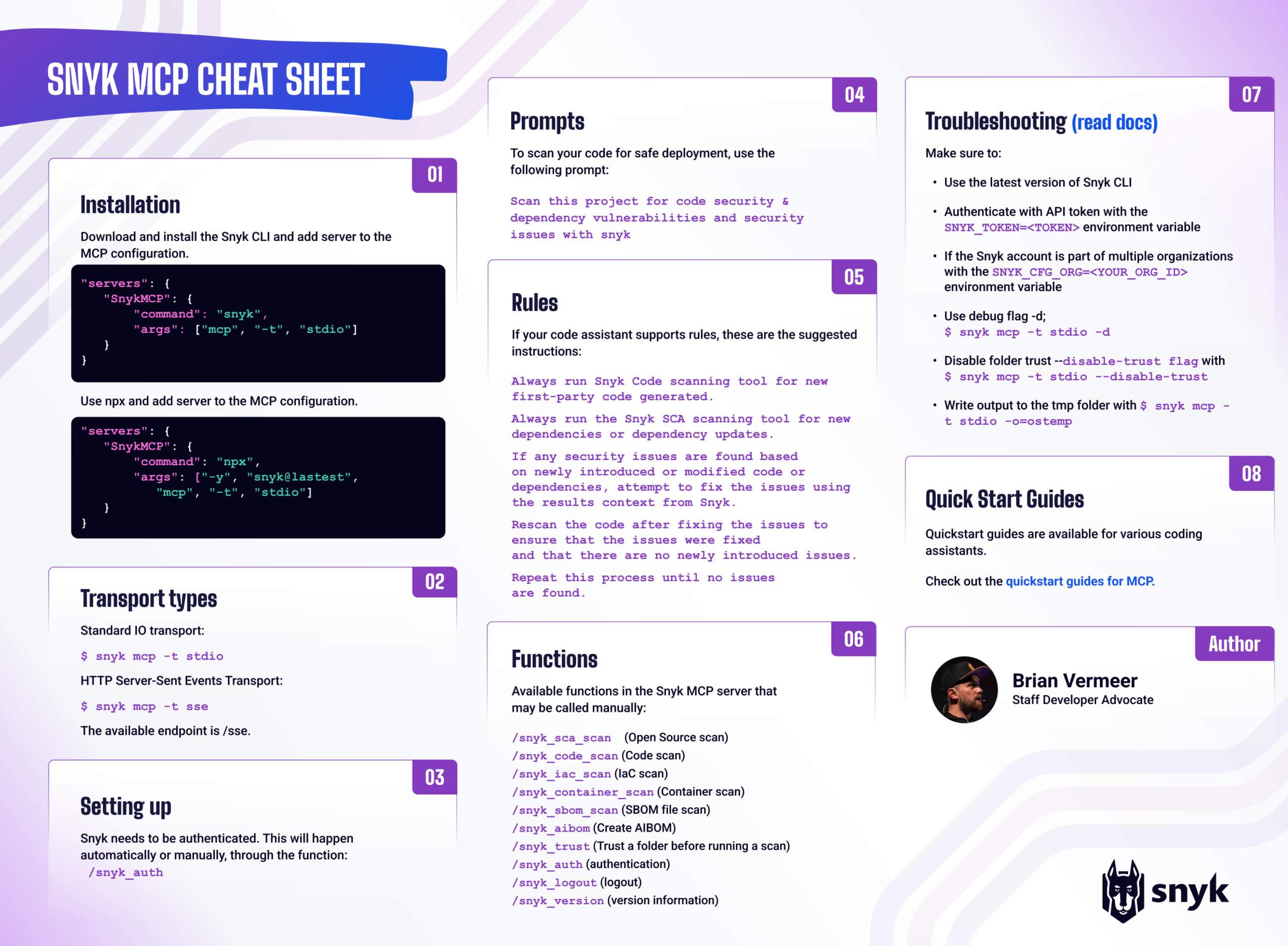
The Snyk MCP Server is a robust tool within Snyk Studio that integrates security scanning into AI workflows. AI models often produce code with vulnerabilities, outdated libraries, or insecure practices. If left unchecked, these issues could enter your applications, increasing security risks or wasting developers' time fixing them. Snyk helps prevent this by embedding security into AI-assisted processes.
MCP is an open standard that enables AI tools to communicate with platforms like Snyk for context and actions. The Snyk MCP server, included in the Snyk CLI, allows AI agents to access Snyk's scanning features directly. This setup lets AI assistants run security scans autonomously and identify vulnerabilities as code is generated or suggested. Incorporating security checks early in AI development helps catch issues before they become serious. Additionally, the Snyk MCP server supports security workflows to fix vulnerabilities at scale.
Snyk's MCP support integrates seamlessly with existing Snyk IDE plugins. While IDE plugins provide real-time feedback to developers during coding, the MCP server broadens security coverage to include AI-generated code. This powerful combination ensures that both manually written and AI-generated code are thoroughly examined, providing a secure foundation for your AI-driven development.
We are continually improving our MCP server, and it has far more power than we can ever address in a single cheat sheet. For a more detailed overview of our MCP server, please look at our Snyk MCP Server documentation.
Installation
The Snyk MCP server is included in the Snyk CLI. To use it, download and install Snyk CLI v1.1298.0 or later by following the steps on the installation page. No additional dependencies are required. Snyk recommends always using the latest version of the CLI.
After installing the Snyk CLI, you can start the MCP server with: snyk mcp -t <transport type>
To set up your MCP server in your coding assistant AI tool, add the MCP server details to the JSON configuration.
We recommend using the full path to the Snyk CLI in the command below.
Alternatively, if npm (Node Package Manager) is installed on your system, you can also use npx (Node Package eXecute) to run the Snyk MCP server.
The Snyk MCP Server is designed as a local MCP server that runs on your system using the Snyk CLI to ensure local file access. Snyk therefore does not offer a hosted, remote version of the MCP server.
Transport types
Snyk MCP supports two types of transport: stdio and SSE. The first, stdio (Standard Input/Output), utilizes the process’s standard input and output streams, providing a fast, lightweight, and direct method for the MCP server and host to communicate locally. SSE (Server-Sent Events) uses a local HTTP event stream—typically designed for remote or networked communication—but here it operates entirely on the same machine. The main difference is that stdio is simpler and more efficient for local interactions, while SSE incorporates an HTTP layer. Since Snyk MCP is intended for local use, stdio is the recommended transport mode.
For stdio:$ snyk mcp -t stdio
For sse: $ snyk mcp -t sse
Setting up
Before using the Snyk MCP, you need to authenticate yourself by logging into your Snyk account. If you don't have an account, you can create a free account here. Once authentication is complete, the Snyk MCP functions are available to your coding assistant or agent.
If you have already authenticated with the Snyk CLI, that should be sufficient. Otherwise, the Snyk MCP server will automatically call the /snyk_auth function and open a browser window so you can log into your account.
You can also manually call the Snyk MCP authentication function in many coding assistants by calling:
/snyk_auth
Prompts
To scan your code for safe deployment, you can use the following prompt.
Scan this project for code security & dependency vulnerabilities and security issues
Depending on the model running in your coding assistant or agent, it will recognize the Snyk MCP immediately and initiate the appropriate scans based on the provided codebase. This will primarily include Snyk Code (SAST) scanning, Snyk Open Source (SCA) dependency analyses, and occasionally Snyk Container scanning.
However, some assistants may attempt to use their own training data to analyze the code instead of utilizing the Snyk MCP. To prevent that from happening, we advise specifically asking for “with Snyk" in the prompt.
Scan this project for code security & dependency vulnerabilities and security issues with Snyk
Rules
In some of the coding assistants, it is possible to add rules or extra instructions globally or per project. For instance, Claude Code, Amazon Q, Github Copilot, and Cursor have this feature available. We recommend adding rules to the agentic system that instruct it to use the Snyk MCP scanner every time code is generated.
The rules can look something like below:
- Always run Snyk Code scanning tool for new first-party code generated.
- Always run the Snyk SCA scanning tool for new dependencies or dependency updates.
- If any security issues are found based on newly introduced or modified code or dependencies, attempt to fix the issues using the results context from Snyk.
- Rescan the code after fixing the issues to ensure that the issues were fixed and that there are no newly introduced issues.
- Repeat this process until no issues are found.
Please note that all systems describe the rules slightly differently. Check our quick guides and your system's documentation for more detailed information.
Functions
The Snyk MCP server enhances your AI agents with various capabilities by utilizing the Snyk CLI. For a comprehensive overview of all functionalities, refer to the Snyk Studio documentation for the latest details on our MCP features.
Core security scanning includes snyk_sca_scan for detecting vulnerabilities in open source dependencies and snyk_code_scan for assessing proprietary code security flaws. To secure infrastructure and containers, snyk_iac_scan examines Infrastructure as Code setups, while snyk_container_scan identifies vulnerabilities in container images.
The MCP also provides software supply chain management tools like snyk_sbom_scan for analyzing existing Software Bill of Materials (SBOM) files and snyk_aibom for creating an AI Bill of Materials. Utility functions, such as snyk_version, display version information, and snyk_logout terminate sessions.
While functions like snyk_trust (for trusting a folder before scanning) and snyk_auth (for login) can be run manually, they usually operate automatically when necessary, although they may open a web browser and require user input.
It's also important to note that executing snyk_sca_scan may require using third-party tools, such as Gradle or Maven, directly on your machine to accurately retrieve the project's dependency tree.
Troubleshooting
To ensure a smooth experience with the Snyk MCP and quickly resolve common issues, here are the most important troubleshooting checks and configurations:
Use the Latest Snyk CLI Version: The MCP integration is actively developed. Always ensure you are running the latest version of the Snyk CLI; compatibility requires version v1.1298.0 or higher.
Basic repository scan (crucial diagnostic): Before assuming an MCP issue, confirm that the Snyk CLI can scan your project directly from the terminal. If a direct scan fails (e.g.,
/path/to/your/snykClitest), resolve that underlying authentication or configuration issue first.Authenticate with API token: If browser-based login fails due to environment restrictions, authenticate by setting your API token as an environment variable:
SNYK_TOKEN=<TOKEN>Specify organization ID: If your Snyk account belongs to multiple organizations, explicitly set the target organization ID to ensure scans appear in the correct location:
SNYK_CFG_ORG=<YOUR_ORG_ID>Enable debug logging: For verbose output to diagnose issues, run the MCP server with the debug flag (
-dor --debug):$ snyk mcp -t stdio -dDisable folder trust: If the automated folder trust mechanism (
snyk_trust) interferes with a headless or non-interactive workflow, disable the feature using the following flag:$ snyk mcp -t stdio --disable-trustVerify environment propagation: Ensure all necessary environment variables, including
SNYK_TOKEN,SNYK_CFG_ORG, and proxy settings, are correctly propagated to the Snyk MCP server process.Write the MCP response to a temporary file: Some clients face issues with large responses, so the MCP server can save the response to a temporary file and ask the LLM to read from it using the
-oflag. For example,$ snyk mcp -t stdio -o=ostemp or $ snyk mcp -t stdio -o=/path/to/absolute/folder.
For comprehensive details, including advanced configuration for SSE Transport and CLI Path permissions, refer to the official Troubleshooting for the Snyk MCP Server guide.
Quickstart guides
To help you get started quickly with Snyk’s MCP integrations, we provide a set of practical Quickstart Guides covering today’s most widely used AI coding assistants and agentic development tools. These guides guide you through connecting each assistant to Snyk Developer Guardrails, enabling you to enforce secure workflows regardless of which tool your team prefers.
We provide Quickstarts for many tools, including:
Amazon Q
Claude Code
Cursor
Gemini Code Assist
GitHub Copilot
JetBrains AI Assistant
Qodo
Windsurf
and many more …
Each guide shows how to configure the MCP integration, validate the connection, and start receiving security-aware results immediately. Explore the full set of guides in the Snyk Studio docs.
Want to learn more on how to orchestrate consistent security controls across your entire AI-driven pipeline and mature your AppSec program with this strategic framework? Download the cheat sheet today.
CHEAT SHEET
Orchestrate, Govern, and Report: Maturing AppSec in the Age of AI with Snyk
Learn how to orchestrate consistent security controls across your entire AI-driven pipeline and mature your AppSec program with this strategic framework.