In this article
CrewAI AIエージェントでセキュリティニュースの要約を作成
さまざまなセキュリティニュースソースや脆弱性データベースを調べるのは大変です。しかし、エージェント型AIワークフローの普及により、この作業をLLMに任せられるようになりました。この記事では、オープンソースのCrewAIフレームワークを使って、セキュリティニュースを収集するAIエージェントを構築する方法を紹介します。
セキュリティニュースを収集するAIエージェント
今回構築するアプリケーションでは、Snyk Vulnerability Databaseから新たなセキュリティ脆弱性を収集し、セキュリティニュースフィードとして提供することに焦点を当てます。
AIエージェントはコマンドラインツールとして動作します。指定したエコシステム(ここではnpm JavaScriptエコシステム)のSnyk Vulnerability Databaseのウェブページを開き、最も重要だと判断した関連性の高いCVEレポートを上位3件選びます。
CrewAIを始める
まずは、ローカル開発環境の好きな場所に新しいプロジェクトディレクトリを作成し、CrewAIフレームワークを初期化します。
必要なものは次のとおりです。
uvパッケージマネージャーがインストールされ、ローカルで使用できること
Pythonランタイム環境(3.x以上。
uvでインストールできます)
任意のディレクトリで、まずcrewaiライブラリとツールをインストールします。
uv tool install crewai続いて、作業中のシェル環境に追加し、crewaiコマンドをグローバル実行ファイルのように使えるようにします。
uv tool update-shellこれで、新しいcrewaiプロジェクトを作成できます。
crewai create crew <your_project_name>次のコマンドを実行して、プロジェクトの依存関係をインストールします。
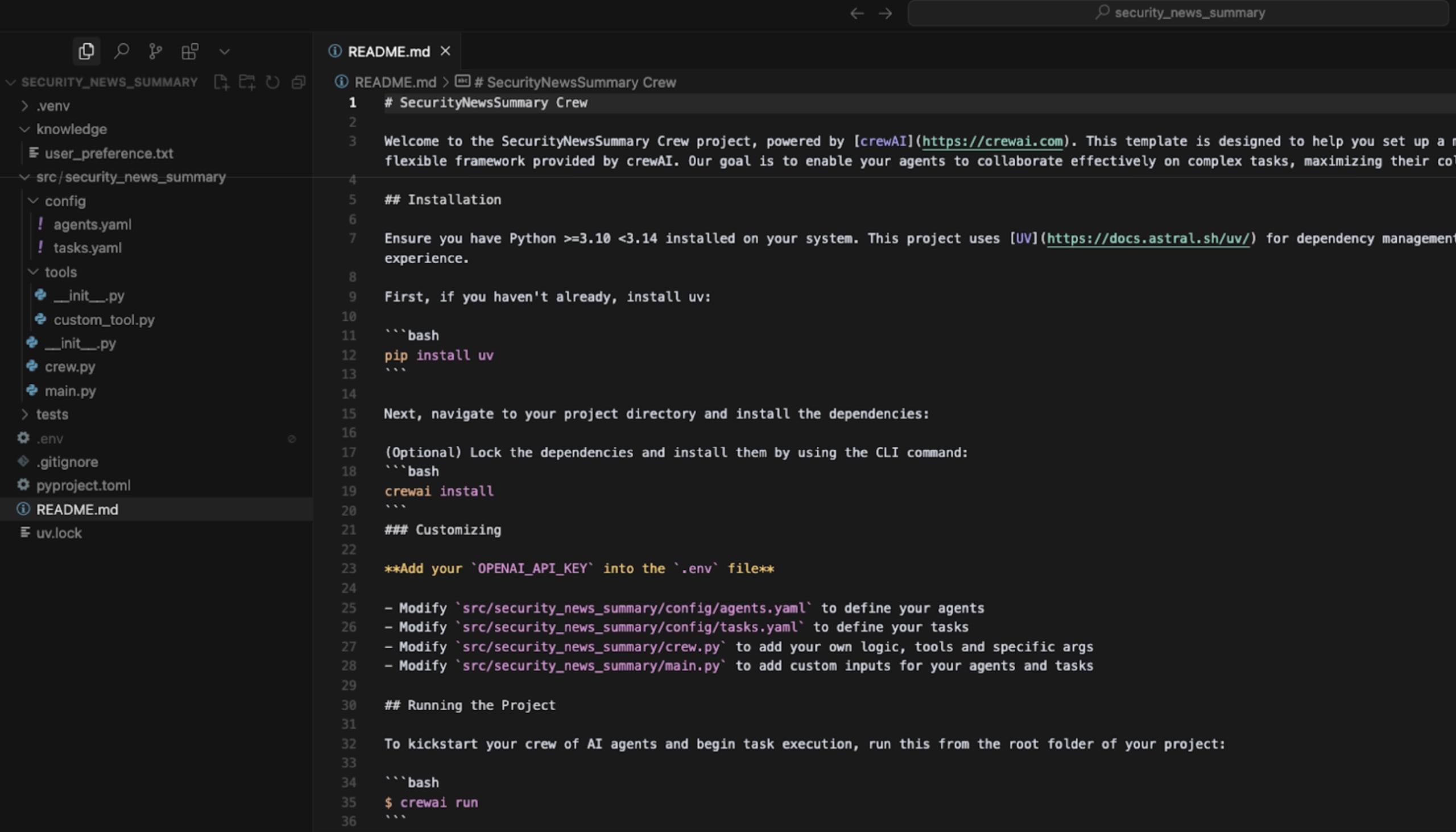
crewai install作成されたプロジェクトディレクトリは、次のような構成になります。

概要として、CrewAIではcrew.pyファイルでエージェントとタスクを定義します。
@agent
def researcher(self) -> Agent:
return Agent(
config=self.agents_config['researcher'], # type: ignore[index]
verbose=True
)
@agent
def reporting_analyst(self) -> Agent:
return Agent(
config=self.agents_config['reporting_analyst'], # type: ignore[index]
verbose=True
)
同じファイルには、エージェントに実行させるタスクも記述されています。
@task
def research_task(self) -> Task:
return Task(
config=self.tasks_config['research_task'], # type: ignore[index]
)
@task
def reporting_task(self) -> Task:
return Task(
config=self.tasks_config['reporting_task'], # type: ignore[index]
output_file='report.md'
)main.pyファイルにはrun()やtrain()などの関数がエクスポートされており、エージェントを呼び出して、作業に必要な入力を渡します。
メインのPythonファイルでのエージェント起動の流れは次のとおりです。
def run():
"""
Run the crew.
"""
inputs = {
'topic': 'AI LLMs',
'current_year': str(datetime.now().year)
}
try:
SecurityNewsSummary().crew().kickoff(inputs=inputs)
except Exception as e:
raise Exception(f"An error occurred while running the crew: {e}")ここまで説明したのは、CrewAIがプロジェクト作成時に用意する標準的なディレクトリ構成です。ここからは変更を加え、独自のエージェントとタスクを定義し、エージェントが呼び出すカスタムツールを作成します。
CrewAIでカスタムのエージェント型ワークフローを構築する
作成したCrewAIプロジェクトの主要な3つの部分を変更します。
config/agents.yamlのエージェントを変更config/tasks.yamlのタスクを変更CrewAIのメインPythonプログラムであるcrew.pyを変更
さらに、人気のPythonライブラリBeautifulSoupを使ってウェブページのHTMLをスクレイピングするカスタムツールを、tools/ディレクトリに作成します。
AIエージェント
AIエージェントを設計する際の基本は、タスクをできるだけ小さく分割することです。ソフトウェアエンジニアリングや設計と同じように、大きな問題を小さく分けると解決しやすくなります。
この考え方に沿って、2つのエージェントを定義します。
CVEキュレーター:ウェブページ内のリンクから、最も重要と判断したCVEを見つける
CVEリサーチャー:個々のCVEリンク(ウェブページ)を開いて、データを抽出する
config/agents.yaml を開き、CrewAIが作成したエージェント定義を次の内容に置き換えます。
1cve_curator:
2 role: >
3 Senior Security Analyst
4 goal: >
5 Find the links to the top most interesting CVEs reported in {security_vulnerabilities_url}.
6 backstory: >
7 You're a seasoned web scraper with a knack for parsing HTML pages and extracting the most relevant information.
8
9cve_researcher:
10 role: >
11 Senior Security Researcher
12 goal: >
13 Summarize and format the CVE information found by the CVE curator.
14 backstory: >
15 You're a meticulous security researcher with a keen eye for detail. You're known for
16 your ability to turn complex data into clear and concise reports, making
17 it easy for others to understand and act on the information you provide.タスク
次に、上記のエージェントに実行させるタスクを定義します。
最初のタスクでは、脆弱性データベースの一覧ページ(検索結果や脆弱性の一覧が表示されるメインページ)からCVEへのリンクを抽出します。
続くタスクでは、CVEリサーチャーエージェントが各CVEの情報ページから脆弱性データを抽出します。
config/tasks.yamlファイルを開き、CrewAIライブラリが作成した内容を次の内容に置き換えます。
cve_curation_task:
description: >
Parse the HTML page to find the top most interesting CVEs reported in {security_vulnerabilities_url}.
You need to select 3 CVEs from the page and extract the link to their vulnerability page.
For example, the link to the vulnerability for the package @trpc/server is: https://security.snyk.io/vuln/SNYK-JS-TRPCSERVER-10060256
You should de-prioritize choosing CVEs for malicious packages. Instead, you should prioritize CVEs for popular packages and those that are likely
to have a high impact on the open-source ecosystem.
expected_output: >
A total of 3 CVEs, each formatted as a bullet point in the following markdown format
```
- https://security.snyk.io/vuln/SNYK-JS-TRPCSERVER-10060256
```
agent: cve_curator
cve_research_task:
description: >
For each of the CVE you should extract information by visiting the link to the vulnerability and extracting the information from the page.
For example, the link to the vulnerability for the package @trpc/server is: https://security.snyk.io/vuln/SNYK-JS-TRPCSERVER-10060256
Once you have the link, visit the page and extract the following information:
1) CVE ID (example: CVE-2025-12345)
2) Type of Vulnerability (example: RCE, SQL Injection, etc.)
3) CVE Publication Date (example: 2025-01-01)
4) Link to the CVE vulnerability page (example: https://security.snyk.io/vuln/SNYK-JS-KIBANA-10339388). The link exists as the href attribute of the anchor tag in the HTML page, set on the name of the vulnerability.
5) Package name that was found vulnerable (example: kibana)
expected_output: >
A total of 3 CVEs, each formatted as a bullet point in the following markdown format (strict markdown formatting for example links should not have space between the [] and () chars):
```
**@trpc/server** found vulnerable to CVE-2025-43855 [Uncaught Exception](https://security.snyk.io/vuln/SNYK-JS-TRPCSERVER-10060256), 24 Apr 2025
```
agent: cve_researcherAIエージェントが解釈して実行できるよう、タスクの指示を慎重に記述していることがわかります。期待する出力例と従うべきルールも含めています。
カスタムツール
最初のエージェントであるCVEキュレーターの最初のタスクを実行するために、Pythonで独自のカスタムツールを作成します。CrewAIに組み込まれているScrapeWebsiteToolはウェブページからテキストを抽出するだけで、HTMLソースをさらに解析して、各CVEのデータへのリンクとなるアンカー要素(<a href>)を抽出できないため、独自に作成する必要があります。
エージェントが使える新しいカスタムツールを作成するには、まずtools/__init__.pyを開き、次のように新しいTableScraperToolをエクスポートするように更新します。
from .custom_tool import MyCustomTool
from .table_scraper import TableScraperTool
__all__ = ['MyCustomTool', 'TableScraperTool']CrewAIのサンプルプロジェクトの初期構成には、MyCustomToolがすでに含まれている点に注意してください。
次にTableScraperToolを作成します。tools/table_scraper.pyという新しいファイルを作成し、次のPythonコードを追加します。
from typing import List, Dict, Any
from bs4 import BeautifulSoup
import requests
from crewai.tools import BaseTool
class TableScraperTool(BaseTool):
name: str = "table_scraper"
description: str = "Scrapes table data from a webpage, extracting rows, links, and other relevant information"
def _run(self, url: str) -> List[Dict[str, Any]]:
"""
Scrapes table data from the given URL.
Args:
url: The URL to scrape
Returns:
List of dictionaries containing table row data
"""
try:
response = requests.get(url)
response.raise_for_status()
soup = BeautifulSoup(response.text, 'html.parser')
# Find all table rows
rows = soup.find_all('tr', class_='table__row')
table_data = []
for row in rows:
row_data = {}
# Extract severity
severity_elem = row.find('li', class_='severity__item')
if severity_elem:
row_data['severity'] = severity_elem.get('class', [''])[0].replace('severity__item--', '')
# Extract vulnerability title and link
title_link = row.find('a', class_='anchor--underline')
if title_link:
row_data['title'] = title_link.text.strip()
row_data['vuln_link'] = title_link.get('href', '')
# Extract package name and link
package_link = row.find('a', attrs={'data-snyk-test-package-manager': True})
if package_link:
row_data['package_name'] = package_link.text.strip()
row_data['package_link'] = package_link.get('href', '')
# Extract version ranges
version_spans = row.find_all('span', class_='vulns-table__semver')
if version_spans:
row_data['version_ranges'] = [span.text.strip() for span in version_spans]
# Extract package manager and date
package_manager = row.find('span', attrs={'type': True})
if package_manager:
row_data['package_manager'] = package_manager.get('type', '')
row_data['published_date'] = package_manager.get('published', '')
if row_data: # Only add if we found some data
table_data.append(row_data)
return table_data
except Exception as e:
return [{"error": f"Failed to scrape table data: {str(e)}"}]
async def _arun(self, url: str) -> List[Dict[str, Any]]:
"""Async implementation of the tool"""
return self._run(url)最後に、BeautifulSoupのPythonライブラリをプロジェクトに追加して更新します。dependenciesのmyproject.tomlリストを次のように変更してください。
dependencies = [
...
"beautifulsoup4>=4.12.0"次のコマンドを実行して適用します。
uv pip install -e .CrewAIのメイン実行ファイル
次に、メインのcrew.pyファイルを編集します。CrewAIプロジェクトを作成したsrc/security_news_summaryなどのディレクトリにあります。
ファイルを編集し、まずインポート部分を次のように更新します(独自のカスタムTableScraperToolを追加します)。
from crewai import Agent, Crew, Process, Task
from crewai.project import CrewBase, agent, crew, task
from crewai.agents.agent_builder.base_agent import BaseAgent
from crewai_tools import ScrapeWebsiteTool
from typing import List
from .tools import TableScraperTool次に下へスクロールし、エージェント(@agentアノテーション)とタスク(@taskアノテーション)の関数を見つけ、上で定義した新しいエージェントとタスクに合わせて更新します。
@agent
def cve_curator(self) -> Agent:
return Agent(
config=self.agents_config['cve_curator'], # type: ignore[index]
verbose=True,
tools=[ScrapeWebsiteTool(), TableScraperTool()]
)
@agent
def cve_researcher(self) -> Agent:
return Agent(
config=self.agents_config['cve_researcher'], # type: ignore[index]
verbose=True,
tools=[ScrapeWebsiteTool()]
)
# To learn more about structured task outputs,
# task dependencies, and task callbacks, check out the documentation:
# https://docs.crewai.com/concepts/tasks#overview-of-a-task
@task
def cve_curation_task(self) -> Task:
return Task(
config=self.tasks_config['cve_curation_task'], # type: ignore[index]
output_file='cves.md'
)
@task
def cve_research_task(self) -> Task:
return Task(
config=self.tasks_config['cve_research_task'], # type: ignore[index]
output_file='cves.md'
)CrewAIでAIエージェントを実行する
これで準備完了です。データソースとしてSnyk Vulnerability Databaseを使い、新しいセキュリティ脆弱性を収集するAIエージェントを実行できます。
ターミナルから次のコマンドを実行して、CrewAIエージェントを起動します。
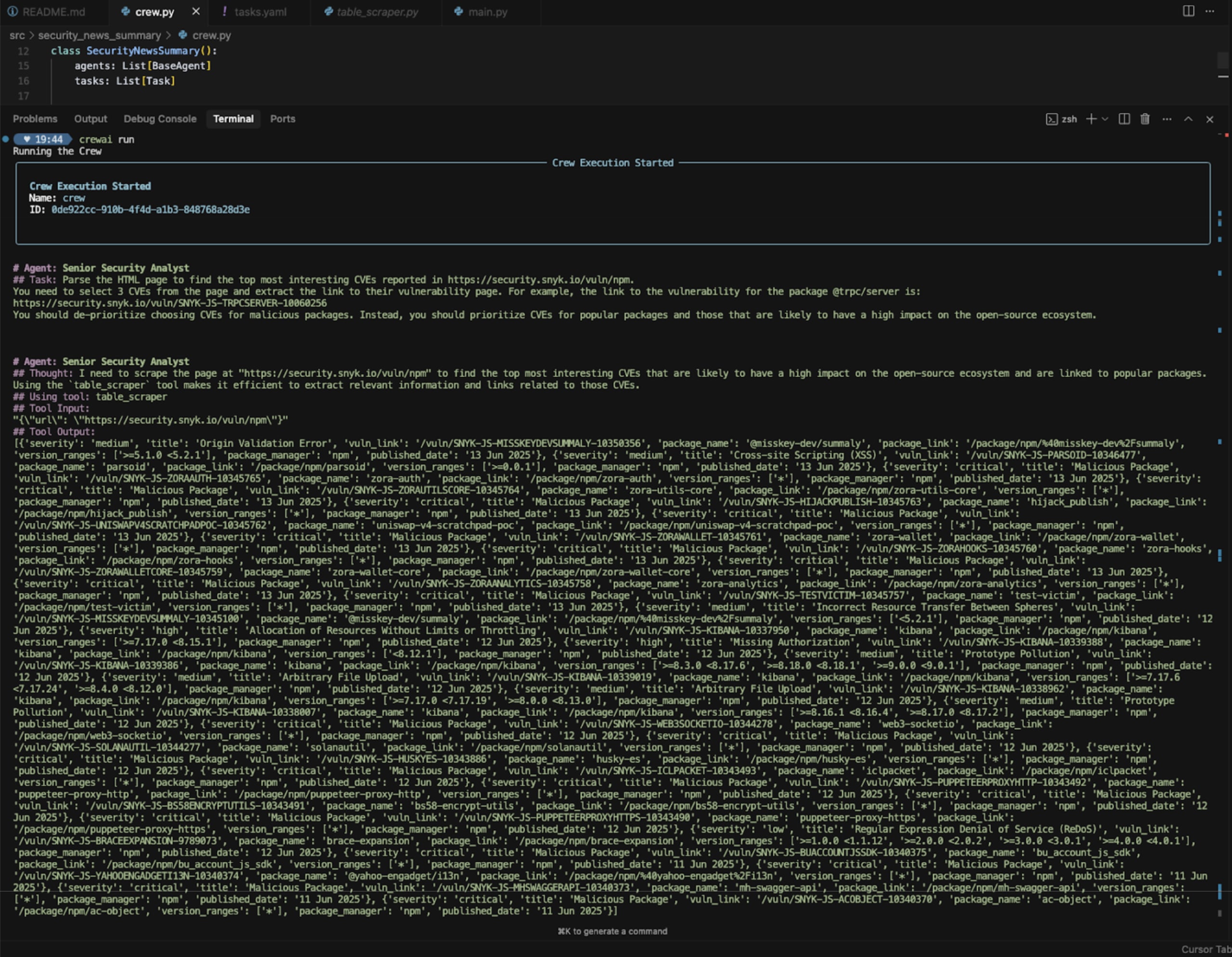
crewai runAIエージェントが作業を開始します。

進行に応じて、タスクの状況が報告されます。

AIセキュリティとエージェント型ワークフローについて
AIエージェントの構築は魔法のように感じられます。うまく動けば驚くほど適切に実行され、エージェントのオーケストレーションに使うCrewAIライブラリも簡単に扱えます。
AIやエージェント型コーディングワークフローは急速に進化しているため、AIへの信頼性に常に注意を払い、AIセキュリティのガードレールを整備することが重要です。安全でないMCPサーバーのデプロイ、プロンプトインジェクション攻撃など、AIセキュリティの脆弱性につながるリスクを持ち込まないようにしましょう。
次のリソースをおすすめします。
SnykのAI Code Guardrailsを確認する
Snykで安全なAIコーディング(MCPサーバーを含む)
プロンプトインジェクションを理解する:手法から課題、リスクまで